
Honeypot Technique of blocking spam
Here is the sample Honeypot Technique of blocking spam adding an invisible field to your forms that just spambots can see, you can trick them into uncovering that they are spambots and not genuin
Read MoreSign Up Now and Get FREE CTO-level Consultation.
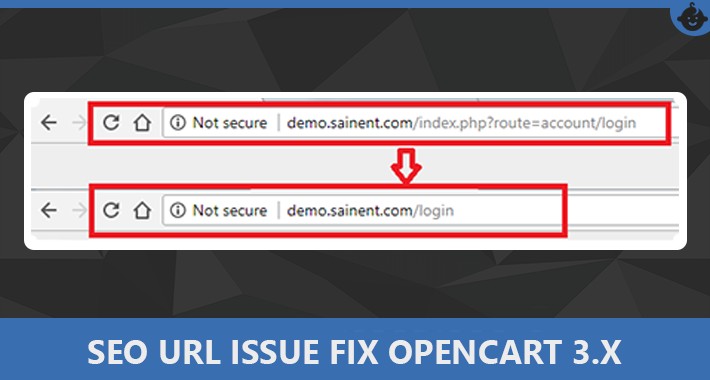
If you're running an online store with OpenCart, one of the first steps toward improving your website’s visibility on search engines is enabling SEO-friendly URLs. These clean URLs are easier for users to read and help search engines better understand your site structure.
In this blog, we’ll walk you through how to enable SEO URLs in OpenCart, and share some important tips to optimize them effectively.
SEO URLs (Search Engine Friendly URLs) are clean, keyword-rich links that describe the content of the page. For example:
Default: https://yourstore.com/index.php?route=product/product&product_id=50
SEO URL: https://yourstore.com/smartphone-x
Search engines and users prefer SEO URLs because they are more descriptive, easier to remember, and look more trustworthy.
Here’s why enabling SEO URLs is crucial for your OpenCart store:
Better Search Engine Rankings
Search engines favor keyword-friendly URLs.
Improved User Experience
Clean URLs are easier to understand and share.
Boosted Click-Through Rates
Users are more likely to click on clear, relevant URLs.
Higher Conversion Potential
Trust-building URLs can lead to more purchases.
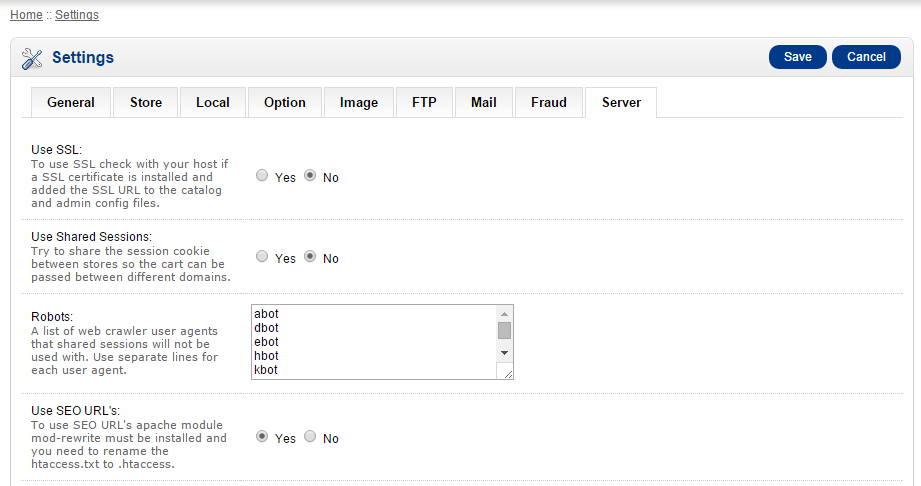
Enable SEO URLs in the OpenCart administrator
# SEO URL Settings
RewriteEngine On
# If your opencart installation does not run on the main web folder make sure you folder it does run in ie. / becomes /shop/

RewriteBase /
RewriteRule ^sitemap.xml$ index.php?route=feed/google_sitemap [L]
RewriteRule ^googlebase.xml$ index.php?route=feed/google_base [L]
RewriteRule ^download/(.*) /index.php?route=error/not_found [L]
RewriteCond %{REQUEST_FILENAME} !-f
RewriteCond %{REQUEST_FILENAME} !-d
RewriteCond %{REQUEST_URI} !.*\.(ico|gif|jpg|jpeg|png|js|css)
RewriteRule ^([^?]*) index.php?_route_=$1 [L,QSA] .htaccess file in a text editor and look for this line:RewriteBase /
If your shop is installed in a directory called “shop“, for example, change the above line in the .htaccess file to:
RewriteBase /shop/
Remember to put the slash (/) at the end. Otherwise the SEO URLs will not work with OpenCart.
Follow these simple steps to enable and configure SEO URLs in your OpenCart store:
.htaccess.txt to .htaccessGo to your OpenCart installation directory using FTP or cPanel File Manager.
Find the file named .htaccess.txt
Rename it to .htaccess (no extension).
This file contains rules that rewrite URLs into SEO-friendly formats using Apache’s mod_rewrite module.
Log in to your OpenCart Admin Dashboard
Go to:
System ? Settings ? Select your store ? Click Edit
Go to the Server tab
Find "Use SEO URLs" and set it to "Yes"
Click Save
Go to Catalog ? Products
Edit a product
Under the Data or SEO tab, find SEO Keyword
Enter a relevant keyword (e.g., smartphone-x)
Save the product
Make sure each SEO keyword is unique across all products, categories, and pages.
For the .htaccess file to work, your server must support Apache mod_rewrite.
If you're using shared hosting, it’s usually enabled.
On VPS or dedicated hosting, you may need to enable it via Apache configuration or contact your hosting provider.
OpenCart’s default SEO URL management is basic. To improve it, you can install SEO extensions like:
SEO Pack Pro
SEO Mega Kit
OCFilter (for layered navigation SEO)
These help generate meta tags, handle redirects, and auto-generate keywords for better SEO performance.
Keep URLs short and keyword-focused
Avoid stop words like "and", "the", "of"
Use hyphens (-) to separate words
Never use spaces or special characters
Always submit updated URLs in Google Search Console
If you’re looking to boost your OpenCart store’s search visibility, Blazingcoders offers expert OpenCart SEO services, custom module development, and speed optimization.
Get cleaner URLs, better rankings, and higher traffic with our OpenCart SEO specialists.
1. How do I enable SEO URLs in OpenCart?
To enable SEO URLs, rename .htaccess.txt to .htaccess and turn on “Use SEO URLs” in the Admin panel under System > Settings > Server.
2. Why are SEO URLs important in OpenCart?
SEO URLs help improve search engine rankings and provide users with clean, readable, and shareable links. Blazingcoders can help set them up professionally.
3. Do I need coding skills to enable SEO URLs in OpenCart?
No. With simple steps in the admin panel and file manager, anyone can enable SEO URLs. Or, let Blazingcoders handle it for you with full support.
4. How do I set custom URLs for products in OpenCart?
Go to a product page in the admin, find the SEO Keyword field, and add a unique, keyword-rich URL slug. Blazingcoders ensures all SEO best practices are followed.
5. Can Blazingcoders help me optimize SEO URLs and OpenCart SEO?
Yes! Blazingcoders offers professional OpenCart SEO services, including URL optimization, SEO extensions, and performance enhancement for better search visibility.
Request a FREE Business Plan.
 +91 ▼
+91 ▼ 
Here is the sample Honeypot Technique of blocking spam adding an invisible field to your forms that just spambots can see, you can trick them into uncovering that they are spambots and not genuin
Read More
In today’s competitive digital world, businesses are under constant pressure to enhance communication, improve customer engagement, and streamline operations. Artificial Intelligence (AI), espec
Read More
In today's hectic travel environment, effectiveness and planning are critical. The correct tools can make all the difference, whether you are an individual organizing a holiday or a business execu
Read More