
Outsource WordPress Development
In today's digital world, a professional website is one of the most valuable business assets. Whether you own a startup, an eCommerce business, a healthcare company, an educational institution, or
Read MoreSign Up Now and Get FREE CTO-level Consultation.
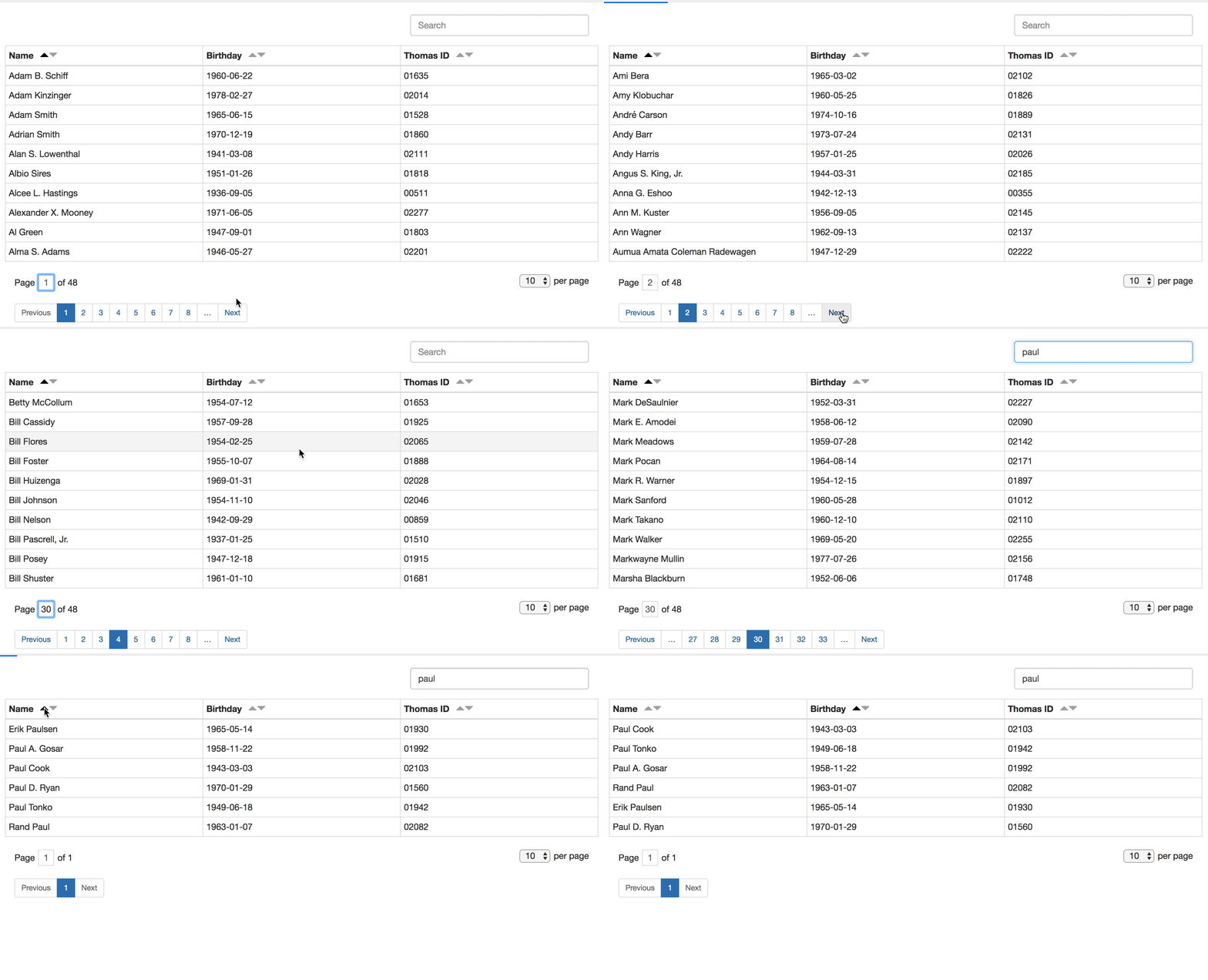
Modern web applications often deal with thousands or even millions of records. Displaying all this data on a single page is not practical because it slows down page loading and negatively affects the user experience. This is where jQuery DataTables with Ajax-based server-side processing becomes the perfect solution.
Instead of loading every record into the browser, DataTables requests only the required records from the server using Ajax. The server handles sorting, searching, and pagination, making the application significantly faster and more scalable.
Whether you're building an employee management system, CRM, eCommerce admin panel, inventory management software, school management system, or reporting dashboard, server-side DataTables can improve performance while providing a smooth user experience.
In this guide, you'll learn everything about jQuery DataTables Ajax-based server-side processing, how it works, its benefits, implementation steps, and best practices.
jQuery DataTables is one of the most popular JavaScript plugins for creating interactive HTML tables.
It transforms a simple HTML table into a professional data grid with advanced features such as:
Pagination
Instant searching
Column sorting
Responsive tables
Export options
Print support
Fixed headers
Row selection
Ajax integration
With only a few lines of JavaScript, you can convert an ordinary table into a feature-rich data table.
Ajax (Asynchronous JavaScript and XML) allows DataTables to communicate with the server without refreshing the page.
Instead of loading all database records when the page opens, DataTables sends an Ajax request to the server whenever the user:
Opens the table
Searches for data
Changes the page
Sorts a column
Refreshes the table
The server processes the request and returns only the records required for that specific action.
This makes the application much faster and reduces unnecessary database queries.
Server-side processing means all major operations happen on the server instead of inside the browser.
These operations include:
Data filtering
Pagination
Sorting
Record counting
Database searching
Instead of sending 100,000 records to the browser, the server sends only the 10 or 25 records required for the current page.
For example:
Imagine your employee table contains:
500,000 Employees
Without server-side processing:
Browser loads all 500,000 rows
Huge memory usage
Slow loading
Poor performance
With server-side processing:
Browser requests only 10 rows
Database returns 10 rows
Page loads instantly
Excellent performance
Server-side processing offers several advantages over client-side processing.
Only a small number of records are loaded initially.
This significantly reduces page loading time.
The browser doesn't need to process thousands of records.
Everything is handled by the database server.
Whether your database contains:
10,000 rows
100,000 rows
1 Million rows
Server-side processing performs efficiently.
Since only limited data is displayed, browser memory consumption stays low.
Users enjoy:
Fast search
Instant pagination
Smooth sorting
Quick loading
without page refreshes.
| Feature | Client Side | Server Side |
| Data Loaded | All Records | Required Records Only |
| Speed | Slow for Large Data | Very Fast |
| Browser Memory | High | Low |
| Pagination | Browser | Server |
| Searching | Browser | Database |
| Sorting | Browser | Database |
| Scalability | Limited | Excellent |
The complete workflow is straightforward.
The webpage loads.
↓
DataTables initializes.
↓
Ajax request is sent to the server.
↓
The server receives:
Page number
Search keyword
Sort column
Sort direction
Number of records
↓
The server queries the database.
↓
Only matching records are returned.
↓
DataTables displays the results.
The user experiences smooth navigation without waiting for large datasets to load.
Whenever DataTables sends an Ajax request, it includes several parameters.
Some common parameters include:
Keeps Ajax requests synchronized.
Starting record position.
Example:
Page 1
Start = 0
Page 2
Start = 10
Page 3
Start = 20
Number of records displayed per page.
Example:
10
25
50
100
Contains the search keyword entered by the user.
Example:
John
Employee
Manager
Defines which column should be sorted.
Example:
Name ASC
Salary DESC
Joining Date ASC
Contains information about every table column.
This helps the server know which columns are searchable and sortable.
The overall implementation process is simple.
Create your HTML table.
Initialize DataTables.
Enable server-side processing.
Configure the Ajax URL.
Write server-side code.
Return JSON data.
Display results automatically.
Once configured, DataTables handles pagination, searching, and sorting with minimal manual effort.
When DataTables is configured with server-side processing, every user interaction communicates with the server through Ajax. Instead of downloading the entire database, the browser requests only the records required for the current view.
Here's how the workflow typically works:
The user opens the webpage.
DataTables sends an Ajax request to the server.
The server receives parameters such as page number, sorting column, search keyword, and page size.
A database query is generated based on these parameters.
Only the matching records are retrieved.
The server returns the data in JSON format.
DataTables updates the table automatically without refreshing the page.
This process repeats whenever the user searches, sorts, changes pages, or refreshes the table.
A typical Ajax request may include information such as:
Current page number
Number of records per page
Search keyword
Sort column
Sort direction
Draw count
The server uses these values to fetch only the required records from the database.
For example, if a user searches for "John", DataTables sends that keyword to the server. The database searches only for matching records and returns those results instead of sending the entire dataset.
DataTables expects a structured JSON response from the server.
A typical response contains:
Draw number
Total number of records
Total filtered records
Data array
Each row inside the data array represents one record that will be displayed in the table.
The JSON response should always contain the correct record counts. This allows DataTables to display accurate pagination and page numbers.
Sorting is one of the most frequently used DataTables features.
Instead of sorting records in the browser, the server performs the sorting directly in the database.
For example, users can sort by:
Employee Name
Salary
Department
Joining Date
Status
The server identifies:
Which column should be sorted
Whether the order is ascending or descending
Then it executes the appropriate database query and returns only the sorted records for the current page.
This approach keeps sorting fast even when the database contains hundreds of thousands of records.
Pagination prevents the browser from loading unnecessary data.
Imagine your employee table contains 500,000 records.
Without pagination:
Every record loads at once.
The webpage becomes slow.
Browser memory usage increases.
Users experience delays.
With server-side pagination:
Page 1 loads only records 1–10.
Page 2 loads only records 11–20.
Page 3 loads only records 21–30.
Only the records needed for the selected page are retrieved from the database.
This keeps page loading times consistently fast regardless of database size.
Searching is another major advantage of Ajax-based DataTables.
Instead of searching thousands of rows inside the browser, the database performs the search.
For example, users may search using:
Employee Name
Employee ID
Department
Designation
Email Address
Mobile Number
The server processes the search request and returns only the matching records.
This ensures much faster response times, especially for enterprise applications with very large datasets.
Server-side DataTables are useful in almost every business application.
Some common examples include:
Employee directory
Attendance reports
Payroll records
Leave management
Student lists
Teachers
Exam results
Fee reports
Patient records
Doctor schedules
Appointments
Billing information
Customer database
Leads
Sales reports
Follow-ups
Products
Stock reports
Suppliers
Purchase history
Products
Customers
Orders
Payments
Shipping records
Transactions
Invoices
Expenses
Income reports
Only the required records are retrieved from the database, resulting in significantly faster page loads.
Database queries remain efficient because they retrieve only the requested rows instead of the entire table.
The browser stores only the visible records, reducing memory consumption and improving responsiveness.
Users can:
Search instantly
Sort quickly
Navigate between pages smoothly
View updated data without page refreshes
As your database grows from thousands to millions of records, server-side processing continues to perform efficiently.
Separating database operations from the front end makes your application easier to maintain and extend.
To achieve the best performance with DataTables, consider the following best practices.
Index frequently searched or sorted columns such as:
ID
Name
Department
Created Date
Indexes dramatically improve query speed.
Avoid using queries that fetch every column if only a few are displayed.
Selecting only the necessary fields reduces processing time and network usage.
Display reasonable page sizes such as:
10
25
50
Avoid very large page sizes that may slow down loading.
Keep SQL queries efficient by:
Avoiding unnecessary joins
Filtering early
Returning only required data
Using proper WHERE clauses
When working with large datasets, enabling server compression can reduce response size and improve loading speed.
If certain records change infrequently, caching can reduce repeated database queries and improve response times.
When implementing server-side DataTables, security should always be considered.
Some important recommendations include:
Validate all incoming request parameters.
Sanitize search inputs before querying the database.
Prevent SQL injection by using prepared statements or query builders.
Restrict access to sensitive data through authentication.
Limit the maximum number of records that can be requested in a single call.
Never expose confidential database fields in the JSON response.
Following these practices helps build secure and reliable web applications.
Many developers enhance DataTables by integrating additional features such as:
Export to Excel
Export to PDF
CSV download
Print support
Column visibility controls
Date range filtering
Multi-column search
Row selection
Bulk delete actions
Inline editing
Responsive mobile layout
Fixed table headers
Custom action buttons
These features create a professional and user-friendly data management experience suitable for business applications of any size.
Although implementing jQuery DataTables with Ajax and server-side processing is straightforward, developers often encounter issues due to small configuration mistakes. Avoiding these common errors can save debugging time and improve application performance.
One of the biggest mistakes is returning the entire dataset from the server instead of only the required records. This defeats the purpose of server-side processing and slows down the application.
DataTables expects a specific JSON response structure. If required fields such as the draw count, total records, filtered records, or data array are missing, the table may not display correctly.
Searching and sorting large tables without proper indexing can result in slow database queries. Frequently searched columns such as ID, Name, Email, Status, or Created Date should be indexed.
Search keywords, sorting parameters, and pagination values should always be validated on the server to prevent invalid requests and improve security.
Selecting every column from the database when only a few are displayed increases query time and network traffic. Retrieve only the fields needed for the table.
Client-side processing works well for small datasets, but once the number of records grows significantly, server-side processing becomes the better choice.
If your DataTable is not working as expected, check the following areas:
Verify that the Ajax URL is correct.
Ensure the server is accessible.
Check browser developer tools for network errors.
Confirm that the server returns a successful HTTP response.
Verify the JSON response format.
Ensure the data array contains records.
Check column mappings between the server response and DataTables configuration.
Confirm that the search keyword is received by the server.
Verify that the database query includes search conditions.
Make sure searchable columns are configured correctly.
Ensure sortable columns are mapped correctly.
Validate the requested sort column and order.
Confirm that the database query applies the requested sorting.
Verify the total record count.
Check the filtered record count.
Ensure the correct page offset and page size are used in database queries.
Once basic server-side processing is working, you can enhance your DataTables with advanced features.
Some popular additions include:
Multi-column searching
Individual column filters
Date range filtering
Dropdown filters
Export to Excel
Export to CSV
Export to PDF
Print functionality
Responsive tables
Fixed headers
Sticky columns
Custom buttons
Row grouping
Inline editing
Checkbox selection
Bulk actions
Dynamic column visibility
Dark mode support
These features improve usability and create a more professional user experience.
To ensure your application remains fast, secure, and maintainable, follow these best practices:
Use Ajax to fetch only required records.
Enable server-side processing for large datasets.
Validate all incoming request parameters.
Use prepared statements or query builders to protect against SQL injection.
Index frequently searched database columns.
Return only the required fields.
Optimize database queries for speed.
Handle errors gracefully.
Compress responses when possible.
Test performance with large datasets before deployment.
Implementing these practices will help your application scale efficiently as your database grows.
jQuery DataTables with Ajax-based server-side sorting, pagination, and searching is one of the most effective solutions for managing large datasets in modern web applications. By shifting data-intensive operations to the server, developers can build applications that remain fast, responsive, and scalable regardless of database size.
Whether you're developing an employee management system, eCommerce dashboard, hospital application, CRM, or reporting platform, implementing server-side DataTables ensures a smooth experience for users while reducing browser load and improving database efficiency.
With proper optimization, secure coding practices, and well-structured database queries, DataTables becomes a reliable component for creating professional, high-performance web applications. Investing time in implementing server-side processing today will help your application scale successfully as your data continues to grow.
jQuery DataTables is a JavaScript plugin that converts a standard HTML table into an interactive table with features like pagination, sorting, searching, Ajax loading, and responsive layouts.
Server-side processing allows the server to handle searching, sorting, and pagination instead of the browser. This approach is ideal for applications with large datasets because it improves speed and reduces browser memory usage.
Ajax enables DataTables to fetch data asynchronously without refreshing the page. This provides a smoother user experience and reduces loading time by requesting only the required records.
Server-side processing is recommended when your table contains thousands of records or when loading all data into the browser would negatively affect performance.
Yes. Since only the required records are retrieved from the database, both browser performance and server efficiency improve significantly.
Yes. DataTables integrates easily with PHP and popular frameworks such as Laravel and CodeIgniter. The server simply needs to return data in the expected JSON format.
Yes. DataTables supports exporting data to Excel, CSV, PDF, and print formats using the Buttons extension.
Yes. By using the Responsive extension, DataTables automatically adjusts its layout for tablets and mobile devices, ensuring a better viewing experience.
Performance can be improved by enabling server-side processing, indexing database columns, optimizing SQL queries, limiting page size, and retrieving only the required fields.
Absolutely. DataTables is widely used in enterprise software such as CRM systems, ERP platforms, HR management, inventory systems, healthcare applications, educational portals, and financial dashboards.
Request a FREE Business Plan.
+91 ▼
In today's digital world, a professional website is one of the most valuable business assets. Whether you own a startup, an eCommerce business, a healthcare company, an educational institution, or
Read More
In today’s fast-moving digital world, startups are looking for smarter ways to launch innovative applications quickly and cost-effectively. Artificial Intelligence has completely transformed the
Read More
A heartfelt approach to honoring and remembering a loved one is to create a memorial website, which gives family and friends a digital platform to do the same. This comprehensive tutorial will show yo
Read More