
Integration Testing Company India
Blazingcoders in India has a dedicated team of testers to perform Integration testing. Integration testing is the phase in software testing in which individual software modules are combined and tested
Read MoreSign Up Now and Get FREE CTO-level Consultation.
If you run an eCommerce store using OpenCart, optimizing your website for search engines is essential for attracting organic traffic and reaching potential customers. One of the simplest technical SEO improvements you can make is enabling SEO-friendly URLs.
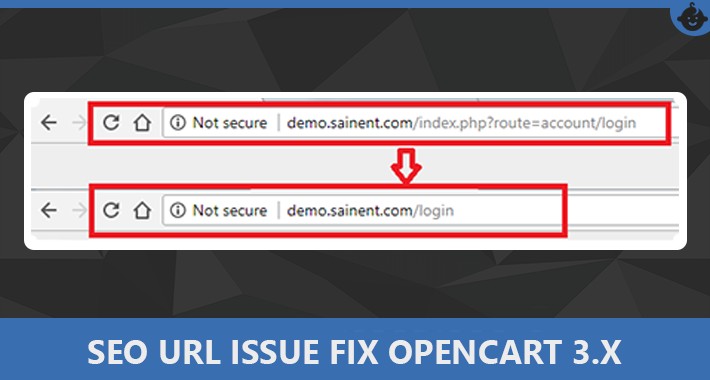
By default, OpenCart can generate URLs containing parameters such as index.php?route=product/product&product_id=50. While these URLs work correctly, they are not as descriptive or user-friendly as URLs such as yourstore.com/smartphone-x.
SEO-friendly URLs make your website structure easier to understand for both users and search engines. OpenCart supports SEO keywords for products, categories, manufacturers, and information pages when the required settings and server configuration are in place.
In this guide, we will explain how to enable SEO URLs in OpenCart, configure the required .htaccess file, create SEO keywords, and avoid common URL-related problems.
SEO URLs, also known as search engine-friendly URLs, are clean and descriptive website addresses that provide information about the page content.
For example:
Default OpenCart URL:
https://www.example.com/index.php?route=product/product&product_id=50
SEO-friendly URL:
https://www.example.com/smartphone-x
The second URL is easier to read, remember, share, and understand.
OpenCart allows you to create SEO keywords for different types of pages, including products, categories, manufacturers, and information pages. These keywords are translated into the corresponding internal OpenCart URLs when a visitor accesses the page.
SEO URLs are an important part of technical and on-page SEO. Although changing a URL alone does not guarantee higher rankings, descriptive URLs contribute to a cleaner website structure and better user experience.
Visitors can understand what a page is about simply by looking at its URL.
For example:
example.com/mens-running-shoes
is much easier to understand than:
example.com/index.php?route=product/category&path=20
A well-organized URL structure can help search engines understand how your website content is organized.
When your URLs clearly describe your products or categories, they can provide additional context about your pages.
Short, descriptive URLs are easier to copy, remember, and share through social media, email, and other channels.
SEO-friendly URLs are one component of a broader SEO strategy that can include content optimization, technical SEO, internal linking, page speed, mobile optimization, structured data, and link building.
How to Enable SEO URLs in OpenCart
Before making changes to your website, it is recommended to take a backup of your OpenCart files and database. This gives you a recovery option if something goes wrong during configuration.
Follow these steps to enable SEO URLs.
First, access the directory where OpenCart is installed.
You can usually access your website files through:
cPanel File Manager
FTP
SFTP
Your hosting control panel
Locate the OpenCart root directory. It normally contains folders such as:
admin
catalog
and other OpenCart files.
Look for a file named:
.htaccess.txt
This file is important because OpenCart uses Apache rewrite rules to convert SEO-friendly URLs into the internal routes used by the application. OpenCart's documentation specifically requires the appropriate .htaccess configuration and Apache mod_rewrite support.
In your OpenCart root directory, rename:
.htaccess.txt
to:
.htaccess
Make sure there is no .txt extension remaining.
If you already have an .htaccess file, do not blindly replace it. Existing hosting, security, caching, redirect, or application rules may need to be preserved.
If your server uses Apache, mod_rewrite must also be enabled for the rewrite rules to work correctly.
Open the .htaccess file and look for:
RewriteBase /
If your OpenCart store is installed in the main domain directory, this is generally appropriate.
However, suppose your store is installed in a subdirectory such as:
https://example.com/shop/
Then the rewrite base may need to reflect that installation path:
RewriteBase /shop/
The correct configuration depends on how and where your OpenCart installation is hosted.
Next, log in to your OpenCart administration area.
Depending on your OpenCart version, the exact menu names and interface can differ. In versions where the setting is available, access your store settings and locate the server-related SEO URL configuration.
OpenCart documentation states that SEO keywords must be enabled from the store settings and that a correctly configured .htaccess file should exist in the root installation directory.
Set the SEO URL option to:
Yes
Then save the configuration.
Enabling SEO URLs is only part of the process. You should also create meaningful and unique SEO keywords for your products.
For example, instead of using a generic product URL, you could create:
example.com/iphone-15-case
rather than:
example.com/product123
Choose a URL keyword that accurately describes the product.
Good URL:
/mens-running-shoes
Less useful URL:
/product-4587
Avoid unnecessary words, random numbers, and complicated URL structures whenever possible.
OpenCart supports SEO keywords for products, categories, manufacturers, and information pages. These keywords need to be unique so that OpenCart can correctly associate the URL with the intended page.
Your category pages should also have descriptive URLs.
For example:
example.com/mens-shoes
example.com/womens-shoes
example.com/mobile-phones
example.com/laptop-accessories
Try to keep category URLs concise and relevant to the actual content of the page.
Avoid creating URLs that are unnecessarily long or filled with repeated keywords.
After configuring the settings and adding SEO keywords, open your storefront in a browser.
Test several types of pages:
Homepage
Product pages
Category pages
Manufacturer pages
Information pages
Cart and checkout pages
Search functionality
Make sure the pages load correctly and do not return 404 errors or redirect loops.
If the old parameter-based URL is still appearing, check the OpenCart version, SEO settings, URL keywords, .htaccess configuration, and server environment.
Sometimes SEO URLs do not work immediately after configuration. Here are some common problems and possible causes.
If your URLs still look like:
index.php?route=product/product&product_id=50
check whether SEO URLs are enabled in your OpenCart settings.
Also verify that your .htaccess file is correctly named and located in the OpenCart root directory.
A 404 error may indicate that the rewrite rules are not being processed correctly.
Check:
.htaccess filename
.htaccess location
RewriteBase
Apache configuration
mod_rewrite
Hosting restrictions
Your hosting provider may need to enable the required Apache functionality.
If your OpenCart store is installed under /shop/, the rewrite configuration may need to reflect this installation path.
An incorrect RewriteBase can prevent SEO URLs from functioning correctly.
Each SEO keyword should be unique for the relevant OpenCart pages.
For example, avoid assigning the same URL keyword to two different products:
/red-shoes
If two pages compete for the same SEO keyword, OpenCart may not resolve the URL as expected.
If your website already uses redirects, caching rules, security rules, or custom rewrite rules, modifying .htaccess without checking the existing configuration can create conflicts.
For a production eCommerce website, it is better to take a backup and test configuration changes carefully.
Simply turning on SEO URLs is not enough to build a search-friendly eCommerce website. Follow these best practices to get more value from your URL structure.
Use:
/wireless-headphones
instead of:
/best-wireless-headphones-for-music-and-gaming-online
Include a keyword that naturally describes the page.
Simple, readable URL slugs are generally easier for users and search engines to interpret.
Create a logical structure across products, categories, and other important pages.
Each important page should have a unique, preferred URL.
If your website already has indexed URLs, changing them without proper redirects can result in broken links and loss of accumulated SEO signals.
When changing established URLs, review your redirect strategy and monitor Google Search Console for crawl and indexing issues.
Enabling SEO URLs is a useful technical improvement, but successful OpenCart SEO requires a broader strategy.
An eCommerce SEO campaign may include:
Keyword research
Product page optimization
Category page optimization
Meta title and description optimization
Technical SEO
Internal linking
Image optimization
Website speed optimization
Mobile SEO
Structured data
Content marketing
Local SEO
Link building
Google Search Console monitoring
Analytics and conversion tracking
For example, a store can have perfectly optimized URLs but still struggle to rank if its product descriptions are thin, pages load slowly, important pages cannot be crawled, or the website lacks relevant content and authority.
That is why SEO should be approached as a complete strategy rather than a single configuration task.
If you are managing an OpenCart store and want to improve its organic visibility, working with an experienced SEO and development team can save time and prevent technical issues.
Blazingcoders is a technology and digital marketing company based in Coimbatore that provides SEO, technical SEO, eCommerce SEO, content marketing, link building, and related digital marketing services. Its SEO services include technical optimization, keyword optimization, on-page SEO, eCommerce SEO, local SEO, and performance tracking.
As an SEO company in Coimbatore, Blazingcoders can help businesses identify technical SEO issues, improve website architecture, optimize important landing pages, and develop strategies designed to increase relevant organic traffic and conversions.
For OpenCart businesses, this can include reviewing SEO URL structures, optimizing product and category pages, identifying technical problems, improving page performance, and developing a long-term search strategy.
The goal should not simply be to generate more traffic. The focus should be on attracting relevant visitors who are more likely to become customers.
SEO-friendly URLs are an important foundation for an optimized OpenCart store. By enabling SEO URLs, configuring .htaccess correctly, creating unique SEO keywords, and maintaining a consistent URL structure, you can make your website easier to navigate and provide clearer signals about your content.
However, SEO URLs are only one part of a successful eCommerce SEO strategy. Technical performance, content quality, keyword targeting, internal linking, mobile usability, and authority all contribute to long-term search visibility.
If you are unsure how to configure OpenCart SEO or want to take your eCommerce website's organic growth further, consider getting professional assistance.
With the right technical setup and a well-planned SEO strategy, your OpenCart store can build a stronger search presence, attract qualified visitors, and create more opportunities for online growth.
Looking for an experienced SEO company in Coimbatore? Connect with Blazingcoders to discuss your website and eCommerce SEO requirements.
Request a FREE Business Plan.
+91 ▼ Blazingcoders in India has a dedicated team of testers to perform Integration testing. Integration testing is the phase in software testing in which individual software modules are combined and tested
Read More
Selecting the right hotel reservation software is essential for ensuring seamless operations, improving guest experiences, and maximizing revenue. With numerous options available, hoteliers must caref
Read More
In today's digital landscape, having a well-designed website is crucial for any business looking to establish an online presence. However, choosing the right web development company can be a chall
Read More