
Unit Testing Company India
Blazingcoders a testing firm in India provides excellent service in Unit testing, as it always important to find the bugs in the early stages of development, it is important to perform Unit testing. U
Read MoreSign Up Now and Get FREE CTO-level Consultation.
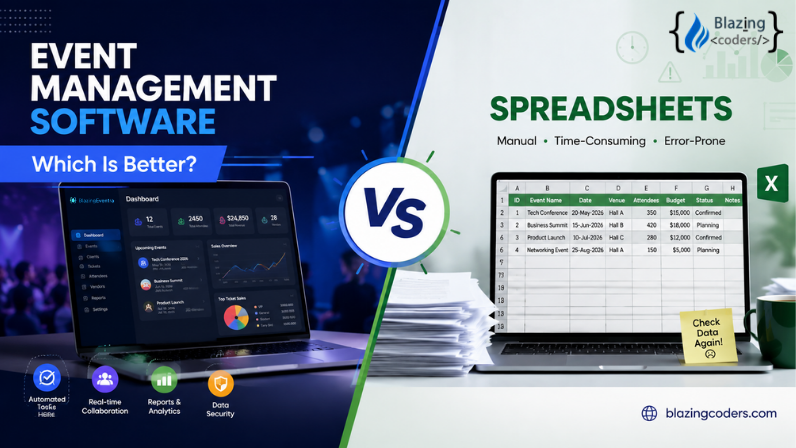
Planning an event involves much more than choosing a venue and sending invitations. Event organizers need to manage registrations, attendees, schedules, vendors, payments, communications, budgets, and last-minute changes—all while keeping the event experience smooth for everyone involved.
For years, spreadsheets have been a popular choice for handling these tasks. They are familiar, flexible, and inexpensive. But as events become larger and more complex, many organizers are asking an important question: Is a spreadsheet still enough, or is event management software a better solution?
The answer depends on the size and complexity of your events. For small, simple events, spreadsheets can work. However, for organizations managing multiple events, large attendee lists, online registrations, payments, or real-time event data, dedicated event management software can provide significant advantages.
In this guide, we'll compare event management software and spreadsheets across the areas that matter most to event organizers and explain how a platform such as BlazingEventra can simplify the entire event management process.
Event management software is a digital platform designed specifically to help organizers plan, manage, promote, and analyze events from a centralized system.
Depending on the platform, features may include:
Online event registration
Attendee management
Ticketing and payments
Event check-in
Event scheduling
Automated email communication
Vendor and speaker management
Budget tracking
Reporting and analytics
Event websites or registration pages
Real-time attendee information
Instead of maintaining separate spreadsheets for different parts of an event, organizers can manage important information within one connected platform.
Spreadsheets such as Microsoft Excel and Google Sheets remain useful tools for event planning. Organizers can create columns for attendee names, contact information, ticket types, payments, vendors, schedules, and other information.
For a small event with a limited number of attendees, this may be sufficient.
For example, if you're organizing a small internal meeting for 20 employees, a spreadsheet may provide everything you need.
The challenges become more apparent when the event grows. More attendees mean more data, more updates, more formulas, and more opportunities for errors.
This is where the differences between spreadsheets and dedicated event management software become important.
| Feature | Spreadsheets | Event Management Software |
|---|---|---|
| Attendee management | Manual | Centralized and automated |
| Registration | Usually manual or requires separate tools | Built-in registration options |
| Ticketing | Requires additional setup | Often integrated |
| Payments | Usually handled separately | Can be integrated |
| Check-in | Manual | Digital check-in options |
| Email communication | Often separate | Automation may be available |
| Reporting | Requires manual work | Automated reports and dashboards |
| Data updates | Manual | Real-time or centralized |
| Collaboration | Possible but can become complicated | Designed for team workflows |
| Scalability | Limited by complexity | Built for growing events |
| Event-specific automation | Limited | Extensive |
Managing attendees is one of the biggest challenges for event organizers.
With a spreadsheet, you may need to manually enter attendee information, update registration status, track payments, assign categories, and remove duplicate entries.
This can become difficult when several team members are working on the same file.
Event management software centralizes attendee information, making it easier to search, update, segment, and manage registrations.
For example, an organizer might want to identify:
Registered attendees
Paid and unpaid attendees
VIP guests
Speakers
Sponsors
Workshop participants
Attendees requiring special arrangements
A dedicated platform can make these tasks much more manageable than manually filtering multiple spreadsheet columns.
Spreadsheets aren't designed specifically for event registration.
You can collect registrations through a form and then transfer the information into a spreadsheet, but this creates another step in the workflow.
With event management software, registration can become part of the event management process itself.
Instead of collecting information in one system and managing it somewhere else, organizers can have registration data flow directly into their event platform.
This can reduce manual data entry and help keep attendee information organized.
Managing event payments through spreadsheets can be particularly challenging.
An organizer may need to track:
Ticket purchases
Payment status
Refunds
Discounts
Complimentary tickets
Different ticket categories
Outstanding balances
A spreadsheet can record these details, but it doesn't inherently process payments or automatically connect transactions with attendee records.
Event management software can integrate ticketing and payment workflows, depending on the platform and payment providers supported.
This can reduce administrative work and give organizers a clearer picture of event revenue.
The event doesn't end when registration closes. In many ways, the most important work begins when attendees arrive.
Manually checking names against a spreadsheet can lead to queues, duplicate entries, and unnecessary delays.
Event management software can support digital check-in workflows, such as attendee searches, QR-code scanning, or digital registration verification, depending on the platform.
A faster check-in process improves the first impression attendees have of an event and gives organizers more visibility into who has actually arrived.
Event communication often involves multiple emails:
Registration confirmation
Payment confirmation
Event reminders
Schedule updates
Venue information
Last-minute announcements
Post-event follow-ups
With spreadsheets, organizers typically need another email platform or must send messages manually.
Many event management platforms provide communication and automation features that can reduce repetitive work.
For example, attendees can potentially receive confirmation messages automatically after registering, while reminders can be scheduled before the event.
Automation doesn't replace the organizer's role. Instead, it gives the team more time to focus on event strategy and attendee experience.
One of the biggest weaknesses of spreadsheet-based event management is the possibility of human error.
Common problems include:
Duplicate attendee records
Incorrect formulas
Accidentally deleted information
Outdated versions of files
Inconsistent formatting
Manual data-entry mistakes
Conflicting updates between team members
Spreadsheets can certainly be managed carefully, but the risk increases as the volume of data grows.
Dedicated event management software is built around structured event data and workflows, helping organizations reduce unnecessary manual handling.
That doesn't mean software eliminates every possible error. Poorly configured systems and incorrect information can still cause problems. However, automation and centralized data can significantly reduce avoidable administrative mistakes.
After an event, organizers need to understand what happened.
Important questions may include:
How many people registered?
How many actually attended?
Which ticket type performed best?
How much revenue was generated?
Which marketing channel produced registrations?
How many attendees participated in each session?
What was the overall event ROI?
With spreadsheets, answering these questions often requires formulas, filters, pivot tables, and manual data preparation.
Event management software can provide dashboards and reports designed specifically for event data.
This can make it easier for event teams to turn registration and attendance information into actionable insights.
Event planning is rarely a one-person job.
Marketing teams, event coordinators, finance teams, vendors, speakers, and management may all need access to event information.
Spreadsheets can support collaboration, especially through cloud-based tools. However, teams can still encounter issues such as accidental edits, unclear ownership, duplicated files, or difficulty understanding which information is current.
A dedicated event management platform can provide a more structured environment where different event activities are managed within a common system.
This becomes especially valuable for organizations running recurring or large-scale events.
Spreadsheets aren't necessarily bad.
They can be a practical option when:
The event is very small.
There are only a few attendees.
Registration is simple.
No online ticketing is required.
The event happens infrequently.
Only one or two people manage the information.
Reporting requirements are minimal.
For a small gathering, moving immediately to sophisticated event management software may introduce unnecessary complexity.
The key is to choose a tool that matches the event's requirements.
Consider moving from spreadsheets to event management software when your team starts experiencing problems such as:
Too much manual data entry: Your team spends hours copying registration information between systems.
Growing attendee numbers: Your spreadsheet becomes difficult to search, filter, or maintain.
Multiple events: Managing separate files for different events becomes confusing.
Payment tracking challenges: Your finance team struggles to reconcile registrations and payments.
Long check-in queues: Manual attendee verification slows down the event experience.
Communication overload: Your team repeatedly sends registration confirmations and reminders manually.
Reporting difficulties: Management needs insights that take hours to calculate manually.
Team collaboration issues: Multiple people need access to constantly changing event information.
These are signs that the administrative workload may be costing your organization more time than the spreadsheet saves.
For organizations looking to move beyond spreadsheets, BlazingEventra provides a dedicated approach to event management.
Rather than relying on disconnected files and manual processes, organizers can use an event management platform to bring key event activities into a more structured workflow.
The goal is simple: reduce repetitive administrative work while giving event teams better visibility and control.
Whether you're managing registrations, attendees, event-day activities, or event data, using purpose-built technology can help your team spend less time maintaining spreadsheets and more time creating successful events.
Before choosing any event management platform, organizations should evaluate their specific requirements, including registration workflows, integrations, reporting capabilities, security, scalability, pricing, and customer support.
So, which is better: event management software or spreadsheets?
For simple and small-scale events, spreadsheets can still be effective.
But when your events involve hundreds or thousands of attendees, online registration, ticketing, payments, automated communication, multiple team members, or detailed reporting, event management software is generally the more scalable choice.
The biggest advantage isn't simply having more features. It's having a system designed around the way events actually work.
A spreadsheet is a flexible general-purpose tool. Event management software is purpose-built to manage the complex workflows associated with events.
If your team is spending more time updating spreadsheets than planning the event itself, it may be time to consider a dedicated platform such as BlazingEventra.
The right technology won't replace good event planning—but it can make good planning easier to execute, measure, and scale.
BlazingEventra is a strong choice for organizations looking for an all-in-one event management software solution. It brings together event registration, marketing, attendee management, ticketing, check-in, badge printing, sponsorship management, mobile event apps, analytics, and other event workflows in one platform.
BlazingEventra is designed to help organizers manage events before, during, and after the event. Its features include registration and marketing, venue and vendor sourcing, speaker management, event websites, RSVP management, QR-code check-in, event badges, sponsorship management, attendee insights, surveys, and lead retrieval.
When choosing an event management software provider, consider features such as online registration, ticketing, attendee management, event check-in, event websites, communication tools, reporting and analytics, integrations, scalability, and support. The right solution should also match your event type, audience size, budget, and operational requirements.
Yes. BlazingEventra supports multiple event formats, including in-person, virtual, and hybrid events. It is also positioned for corporate events, conferences, exhibitions and trade shows, workshops and training programs, social events, fundraising events, and entertainment events.
Yes. BlazingEventra includes registration and marketing capabilities as well as smart ticketing functionality. Its published features include registration management, ticket activation and expiry settings, discount codes, and ticket sales management.
Yes. BlazingEventra provides event check-in functionality, including QR-code scanning, self-check-in options, VIP and special-session access management, and custom badge printing. These tools are designed to help organizers streamline event-day entry.
Yes. BlazingEventra is designed for corporate and business events such as conferences, product launches, meetings, networking events, and other professional gatherings. Its platform includes tools for registration, scheduling, attendee management, engagement, and event analytics.
It can. Event management software can help organizers track registrations, ticket sales, revenue, attendance, session participation, attendee behavior, and other event metrics. BlazingEventra provides event and attendee insights intended to help organizers evaluate performance and make data-informed decisions.
Yes. BlazingEventra provides integrations intended to connect event data with existing business and marketing workflows. Its published integration information mentions connections with platforms such as Salesforce, HubSpot, and Marketo.
Yes. BlazingEventra supports in-person, virtual, and hybrid event formats. Its platform is designed to help organizers coordinate registration, attendee engagement, communication, and event experiences across different event formats.
For complex events, event management software generally offers more specialized functionality than Excel, including registration, attendee management, ticketing, check-in, automation, and reporting. Excel can still be useful for simple events and specific planning tasks.
Yes. Small businesses can benefit from event management software when they regularly organize workshops, conferences, networking events, training sessions, or customer events. The key is choosing a platform that matches their event volume and budget.
The main challenges include manual data entry, increased risk of errors, limited automation, fragmented workflows, and difficulty managing large amounts of attendee information.
There's no universal attendee number that determines when you should switch. A better indicator is complexity. If your team is struggling with registrations, payments, attendee tracking, communication, collaboration, check-in, or reporting, dedicated event management software may be worth considering.
Look for features that match your specific needs, such as registration, ticketing, attendee management, payment integrations, check-in, communication, analytics, security, integrations, scalability, and customer support.
Request a FREE Business Plan.
 +91 ▼
+91 ▼ Blazingcoders a testing firm in India provides excellent service in Unit testing, as it always important to find the bugs in the early stages of development, it is important to perform Unit testing. U
Read More
In this article, we are going to discuss Steps to follow the Codeigniter website optimizer. We are Web development, Software development, and Mobile application development company for many organizati
Read More
In the dynamic world of web development, PSD to HTML conversion remains a cornerstone for creating visually appealing and fully functional websites. For businesses and designers, outsourcing this serv
Read More